
Create Video with AI: The Complete Guide for 2026

Modest Mitkus
May 18, 2026
The way we produce video content has fundamentally changed. What once required production crews, expensive equipment, and weeks of coordination now happens in minutes through AI-powered platforms. Whether you're a brand manager testing ad creatives, a solo entrepreneur building a social presence, or an agency juggling dozens of clients, the ability to create video with AI has become essential to staying competitive in 2026.
Why AI Video Creation Matters Now
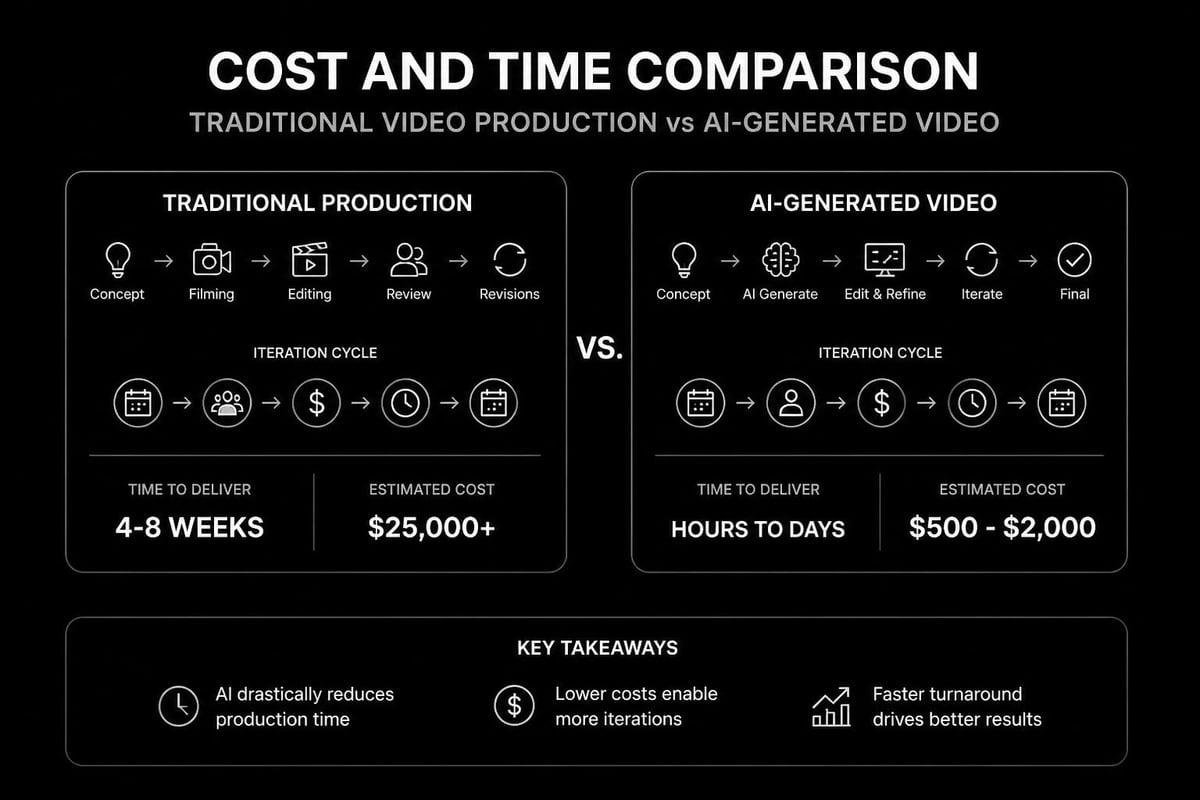
Traditional video production carries heavy costs that compound with every iteration. You book talent, schedule shoots, rent equipment, and wait for deliverables. If something doesn't perform? Start over.
AI video generation eliminates most of these friction points. The technology has matured from novelty to production-ready, with platforms now capable of generating realistic footage that performs as well as traditionally produced content in many contexts.
Key advantages driving adoption:
- Speed: Generate multiple video variations in the time it takes to brief a creator
- Cost efficiency: Produce dozens of test variations for the price of a single traditional shoot
- Iteration velocity: Adjust scripts, hooks, or visual elements instantly based on performance data
- Scalability: Create localized versions, seasonal updates, or format variations without additional shoots
The shift isn't just about saving money. It's about fundamentally changing how we approach video strategy. Instead of betting everything on one carefully crafted piece, marketers can now test assumptions, validate concepts, and optimize based on real performance data before committing serious production budgets.
How AI Video Generation Actually Works
Understanding the mechanics helps you get better results. Modern AI video platforms combine several technologies working in concert.
The Core Components
Text-to-Video Models
These neural networks translate written descriptions into visual sequences. They've been trained on millions of video clips to understand how objects move, how scenes transition, and what "realistic" motion looks like. When you create video with AI through text prompts, you're tapping into these massive pattern recognition systems.
Synthetic Actors and Voices
Advanced models can generate photorealistic human figures with natural movement and speech patterns. The technology has progressed beyond the uncanny valley that plagued early attempts. Modern AI actors can deliver scripts with appropriate facial expressions, gestures, and vocal inflection.
Scene Composition and Editing
AI systems handle the traditional editing workflow automatically, selecting appropriate shots, timing cuts, and matching audio to visuals. What would take a skilled editor hours happens algorithmically in minutes.
The Generation Process
- Input definition: You provide either a text prompt describing the desired video or select from preset options (actors, scenes, scripts)
- Processing: The AI model interprets your inputs and generates the video frames sequentially
- Rendering: Individual frames are compiled into video format with synchronized audio
- Output: You receive a finished video file ready for use or further editing
Google's Gemini Omni model demonstrates how far this technology has advanced, producing photorealistic videos with complex movements and accurate text rendering.
Choosing the Right AI Video Platform
Not all AI video generators serve the same purpose. Your choice depends heavily on what you're trying to accomplish.
| Platform Type | Best For | Typical Use Cases |
|---|---|---|
| UGC-focused | Ad creative testing | Social ads, product demos, testimonial-style content |
| General text-to-video | Conceptual content | Explainers, stock footage alternatives, social posts |
| Professional editing assistants | Streamlining workflows | Long-form content, documentary work, corporate videos |
Evaluation Criteria
Output quality matters more than feature lists. Generate test videos before committing. Look specifically at:
- Facial realism and natural expressions
- Movement fluidity and physical accuracy
- Audio sync and voice quality
- Background consistency across frames
Speed and scalability determine whether the tool fits into rapid testing workflows. Can you generate 10 variations in an hour? Does batch processing work reliably?
Customization depth varies widely. Some platforms offer extensive control over every element, while others prioritize simplicity with preset options. Neither approach is universally better-it depends on your skill level and time constraints.
Integration capabilities become crucial if you're feeding content into ad platforms, CRM systems, or content management tools. API access, export formats, and bulk operations matter at scale.
When you create video with AI specifically for advertising, look for platforms built around that use case. Generic text-to-video tools often lack the specific features advertisers need: A/B testing support, hook variations, call-to-action overlays, and platform-specific formatting.
Practical Applications Across Industries
AI video creation solves different problems depending on your industry and objectives.
E-Commerce and Direct-to-Consumer Brands
Product demonstration videos drive conversion, but traditional production doesn't scale when you're testing dozens of SKUs or running seasonal promotions.
- Generate product-in-hand demonstrations showing items from multiple angles
- Create comparison videos highlighting features against competitors
- Produce unboxing-style content that mimics organic UGC
- Test different spokesperson styles and demographics without additional shoots
Performance Marketing and Agencies
Ad creative is the ultimate testing ground. Performance marketers need volume and variation to find winning combinations.
The AI UGC Video Generator approach lets you generate multiple versions of the same core message with different hooks, actors, and visual styles. Instead of committing to one creative direction, you can test five variations simultaneously and let performance data guide production decisions.
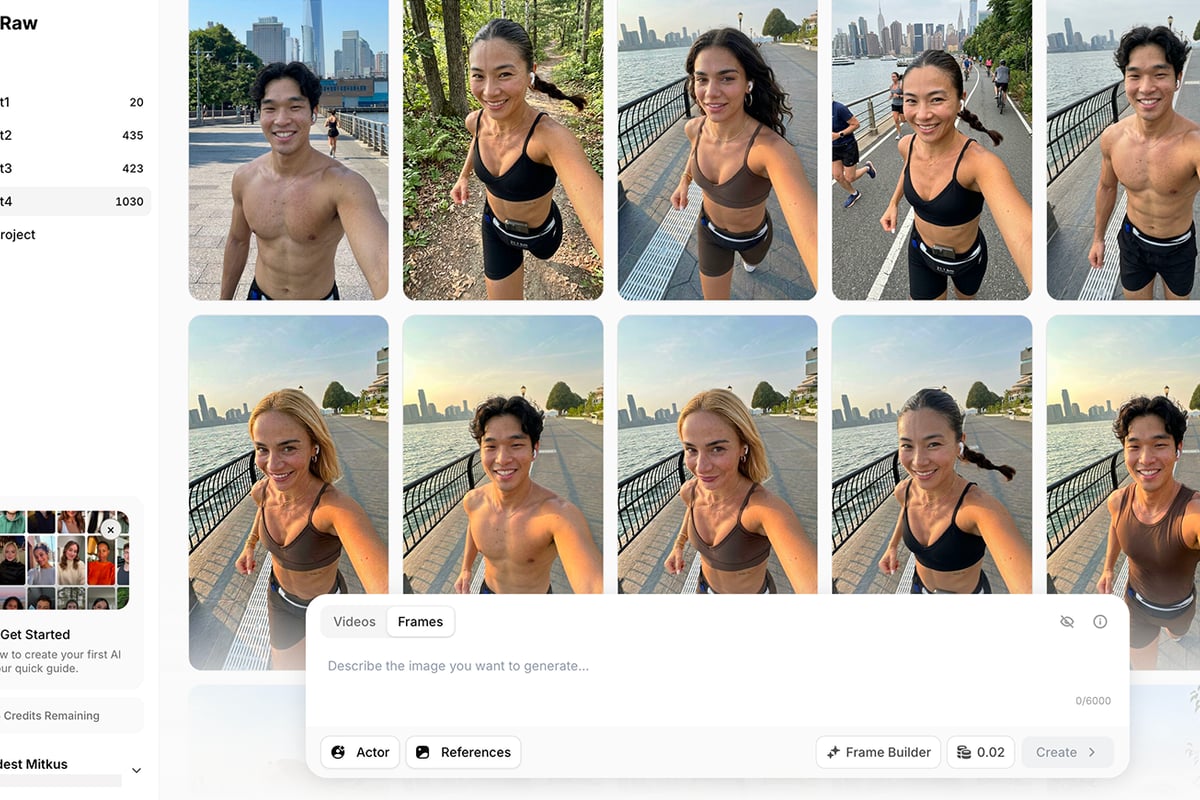
Testing frameworks become more sophisticated when production constraints disappear:
- Hook variations: Test 10 different opening lines in the same video format
- Actor testing: See which demographic performs best for your audience
- Script length optimization: Compare 15-second, 30-second, and 60-second versions
- Visual style testing: UGC aesthetic vs. polished product shots
Content Creators and Social Media Managers
Consistent posting schedules require constant content production. AI tools help maintain cadence without burning out.
- Repurpose blog content into video format automatically
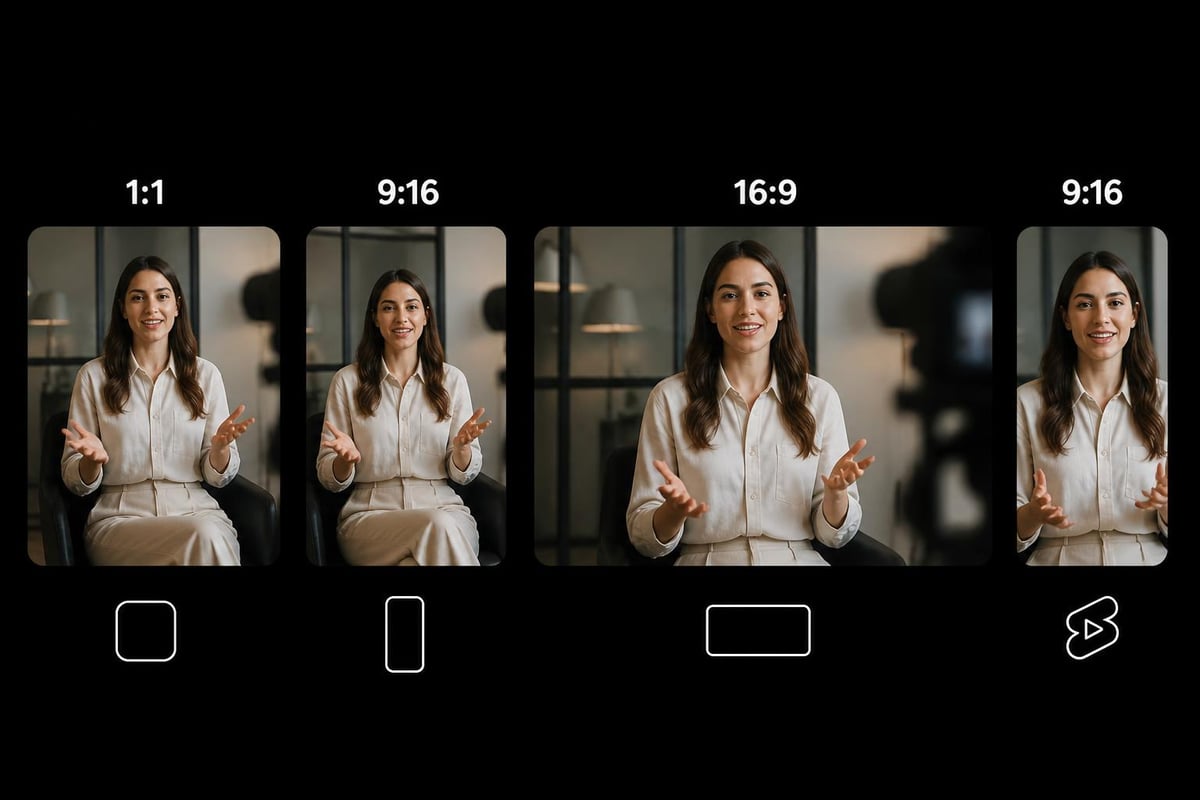
- Generate multiple platform-specific versions from one core script
- Create supplementary B-roll footage to enhance primary content
- Produce seasonal or timely variations without full production cycles
Adobe's Firefly Quick Cut demonstrates how AI can accelerate the editing process by generating draft cuts from raw footage, particularly valuable for creators managing multiple projects simultaneously.
Writing Effective Prompts and Scripts
The quality of your output depends heavily on input quality. Whether you're using pure text-to-video generation or script-based systems, certain principles apply universally.
Specificity Wins
Vague prompts produce generic results. Instead of "woman talking about skincare," try "woman in her 30s with natural makeup holding a moisturizer jar, speaking directly to camera in bright, minimal bathroom, explaining three-step routine."
Include these elements in prompts:
- Physical details (age range, appearance, styling)
- Setting and environment specifics
- Tone and emotional quality
- Action or movement descriptions
- Key props or products
- Desired framing or camera angles
Script Structure for AI Video
When you create video with AI using scripted content, structure matters as much as words.
Hook (First 3 seconds)
Open with a question, bold statement, or pattern interrupt. AI actors excel at delivering punchy opening lines that stop the scroll.
Value proposition (Seconds 4-10)
State the benefit clearly. What problem are you solving? Why should viewers care?
Demonstration or proof (Seconds 11-25)
Show the product, explain the process, or present evidence. Visual elements should support verbal claims.
Call to action (Final 5 seconds)
Tell viewers exactly what to do next. Be direct and specific.
Common Prompt Mistakes
- Being too general: "Create a product video" gives the AI nothing to work with
- Overcomplicating: Prompts with 15 different requirements often produce confused results
- Ignoring platform context: What works on TikTok differs from LinkedIn
- Skipping iteration: Your first prompt rarely produces the best result
Optimizing AI-Generated Videos for Performance
Raw AI output is rarely final. Smart creators treat generated videos as starting points for optimization.
Technical Optimization
File format and compression matter more than most realize. Different ad platforms have specific requirements:
| Platform | Recommended Format | Max File Size | Aspect Ratio Options |
|---|---|---|---|
| Meta/Instagram | MP4 (H.264) | 4GB | 1:1, 4:5, 9:16 |
| TikTok | MP4/MOV | 287MB | 9:16 |
| YouTube | MP4 (H.264) | 256GB | 16:9, 9:16 |
| MP4 | 5GB | 1:1, 16:9 |
Export settings checklist:
- Resolution: 1080p minimum for most platforms
- Frame rate: 30fps standard, 60fps for high-motion content
- Bitrate: Balance quality against file size restrictions
- Audio: -14 LUFS for consistent volume across platforms
Creative Enhancement
Even perfectly generated AI video benefits from post-processing touches:
- Add captions: 85% of social video plays without sound
- Insert branded elements: Lower thirds, watermarks, end cards
- Color grading: Slight adjustments improve visual consistency
- Sound design: Background music and sound effects increase engagement
A/B Testing Framework
The ability to create video with AI cheaply and quickly enables sophisticated testing that wasn't economically viable before.
Test variables systematically:
- Hook variations (keeping everything else constant)
- Actor demographics (same script, different presenters)
- Visual style (polished vs. raw UGC aesthetic)
- Script length (15s vs. 30s vs. 60s versions)
- CTA placement (mid-roll vs. end-card)
Run tests with statistical significance. Don't declare winners based on 100 impressions. Wait for at least 1,000 views per variation, preferably more depending on conversion rates.
Research on generative AI in content creation shows how creators are integrating these tools across their production workflows, from initial concept through final editing.
Navigating Quality and Authenticity Concerns
AI-generated video still faces skepticism. Understanding these concerns helps you address them proactively.
The Realism Question
Can people tell the difference? Sometimes yes, sometimes no. Studies on AI-generated ASMR videos show that both humans and vision-language models struggle to consistently identify AI-generated content, particularly in certain contexts.
What affects perceived authenticity:
- Movement naturalness: Jerky or unnatural motion triggers skepticism
- Audio sync: Even slight lip-sync issues create uncanny valley effects
- Contextual appropriateness: AI-generated content works better in some formats than others
- Visual consistency: Frame-to-frame stability matters significantly
Disclosure and Transparency
Platform policies around AI-generated content continue evolving. As of 2026, most major platforms require disclosure when content is substantially AI-generated, particularly in advertising contexts.
Best practices:
- Disclose AI use when platform policies require it
- Consider voluntary disclosure for audience trust
- Focus on value delivery rather than hiding production methods
- Use AI as a tool within broader creative strategy, not as complete replacement
Hybrid Approaches
The most effective video strategies often blend AI-generated and traditionally produced content.
- Use AI for rapid testing, then produce winners traditionally
- Generate B-roll or supplementary footage with AI, capture A-roll traditionally
- Create AI variations of proven traditional content
- Combine AI actors with real product footage
When optimizing video content for search engines and discovery, automated SEO services can help ensure your video descriptions, titles, and supporting content are optimized for maximum visibility across platforms.
Advanced Techniques and Future Capabilities
Cutting-edge applications push beyond basic generation into sophisticated creative territory.
Geographic and Environmental Grounding
New tools like Map2Video use real-world street view imagery to generate AI videos grounded in specific locations. This enables creators to produce content set in recognizable places without traveling or obtaining location permits.
Applications include:
- Real estate showcases in actual neighborhoods
- Travel content featuring specific destinations
- Location-based advertising with geographic relevance
- Environmental storytelling using recognizable landmarks
Multi-Scene Narratives
Early AI video generators produced single-scene clips. Modern platforms handle multi-scene narratives with transitions, maintaining character and visual consistency across cuts.
This enables more complex storytelling:
- Problem-solution narratives across multiple scenes
- Before-after transformations
- Step-by-step tutorials with scene changes
- Character-based storytelling with plot progression
Interactive and Personalized Video
Emerging capabilities allow dynamic video generation based on viewer data. Imagine ad creative that adjusts messaging, visuals, or offers based on viewer demographics, location, or behavior.
While fully personalized AI video generation remains expensive at scale in 2026, the technology exists and costs are declining rapidly.
Integration with Broader Marketing Workflows
AI video doesn't exist in isolation. Maximum value comes from integrating it into comprehensive marketing systems.
Content Calendar Integration
When you create video with AI on-demand, content calendars become more flexible and responsive.
- Generate timely content responding to trends within hours
- Fill scheduling gaps without emergency production rushes
- Test content ideas before committing calendar space
- Produce seasonal variations without months of lead time
CRM and Personalization Systems
Connect AI video generation to customer data platforms for segmented creative:
- Generate product demos featuring items in viewer's cart
- Create personalized explainer videos based on user behavior
- Produce follow-up content tailored to purchase history
- Build nurture sequences with customized video messages
Analytics and Attribution
Track performance metrics specific to AI-generated content:
- Cost per acquisition compared to traditional creative
- Engagement rates across AI variants
- Conversion performance by actor, script, or visual style
- ROI calculations factoring reduced production costs
Just as production audiovisuelle requires careful planning and execution across multiple stages, AI video creation benefits from systematic workflow integration. Traditional production and audiovisual creation agencies bring valuable expertise in storytelling, pacing, and visual composition that informs better AI video prompting and post-processing.
Cost Considerations and ROI Calculation
Understanding true costs helps justify adoption and measure success.
Direct Cost Comparison
| Production Method | Cost Range | Turnaround Time | Variation Cost |
|---|---|---|---|
| Traditional production | $2,000-$10,000+ | 2-6 weeks | 50-75% of original |
| AI generation | $0-$500 | Minutes to hours | Near zero |
| Hybrid approach | $500-$3,000 | Days to 2 weeks | 25-40% of original |
These figures vary based on complexity, quality requirements, and volume.
Hidden Costs and Considerations
Learning curve investment: Teams need time to master effective prompting and optimization. Budget for experimentation and training.
Platform subscriptions: Most AI video tools operate on subscription models. Evaluate usage volumes to select appropriate tiers.
Post-production needs: Budget for editing software, stock assets, or design resources to polish AI outputs.
Testing infrastructure: Performance testing requires ad spend. Allocate budget for meaningful test audiences.
Calculating True ROI
Beyond simple cost savings, measure:
- Increased testing velocity (how many more variations you can test)
- Time-to-market improvement (speed advantage over competitors)
- Conversion rate improvements (better performing creative from iteration)
- Resource reallocation (creative team freed for strategic work)
Getting Started with AI Video Creation
Ready to begin? Follow this practical roadmap.
Phase 1: Experimentation (Weeks 1-2)
Start small and learn the fundamentals:
- Select one AI video platform aligned with your primary use case
- Generate 5-10 test videos exploring different styles and approaches
- Share outputs with team members and stakeholders for feedback
- Document what works and what doesn't
Success metric: Produce at least one AI-generated video you'd consider using publicly.
Phase 2: Strategic Testing (Weeks 3-6)
Run structured experiments:
- Identify one current video creative as baseline
- Create 3-5 AI variations testing specific hypotheses
- Run controlled tests with real audience segments
- Measure performance against your baseline
Success metric: Identify at least one AI-generated variation that performs within 20% of your traditional baseline.
Phase 3: Workflow Integration (Weeks 7-12)
Incorporate AI video into regular operations:
- Define clear use cases where AI provides maximum advantage
- Establish approval workflows for AI-generated content
- Train team members on prompting and optimization
- Build template libraries for common video needs
Success metric: 25% of your video content incorporates AI-generated elements.
Phase 4: Optimization and Scale (Month 4+)
Refine and expand:
- Analyze performance data to identify patterns in successful AI content
- Develop internal best practices and guidelines
- Explore advanced applications and techniques
- Consider hybrid approaches combining AI and traditional production
To streamline your entire content marketing workflow alongside video creation, explore AdsRaw's full platform capabilities and see how different tools integrate to support comprehensive creative testing strategies.
The ability to create video with AI has shifted from experimental technology to essential competitive advantage. Brands that master rapid video iteration, test more creative concepts, and optimize based on performance data will consistently outperform those stuck in traditional production cycles. If you're ready to transform how your brand approaches video advertising, AdsRaw offers the complete platform to generate scroll-stopping UGC-style ad videos in minutes, test unlimited variations with AI actors, and scale your creative output without the traditional bottlenecks of hiring creators and managing complex production workflows.